Resources

17/07/2014

Voice Thread - Create - Share - Assess


Click for source of photo.
This past year, while I was taking Integration of Technology Part 1, I discovered a great new tool - Voice Thread.  In general, when I explore a new web tool I follow inquiry process.   My overall question when I begin to learn  about the tool is how can I apply this in the classroom?  My learning then goes as follows:  read an overview of the tool, explore the tool, become frustrated because the tool is not doing what I expect it to do, find someone who knows about the tool and ask questions.  As I explored Voice Thread, or VT, last year I decided to try and use it with my class as a diagnostic tool.  I created a VT for my class and shared it.  Then my frustration began.  First, my class could not find it, then I received an e-mail from a teacher asking if I shared something with her.  She told me that she was exploring with VT as well and shared and let me know that I had shared the video within the board.  I realized that I needed to find someone who could share the basics of VT.

After learning the basics about VT, here I am ready to reboot for the following year.  My teaching partner, Chantelle Davies and I are planning to use VT as a class tool.  One idea we have discussed is for a couple of students to be recorders of the week’s learning.  As VT allows creators to use images, videos and text, the idea is for the students to capture key learning ideas of the week and share it with the class.  With this single idea, students can create, share and be assessed.

The nice thing about VT is that it addresses a variety of learning styles and can be used to capture students knowledge in a creative way.  VT allows the user to read text and see images (Visual Learner), listen to comments (Auditory Learner) and engages students through the use of technology (Kinesthetic Learner).  It allows struggling writers the opportunity to share their knowledge orally.  This allows students a differentiated way of sharing their knowledge.  Think of the success and confidence a student might show if they were given this tool as opposed to a pencil and paper when given a reading response question.  

As students use this tool to share their knowledge comments can be created by peers and teachers.  As stated in previous blogs, comments should lead to new learning or should lead to questions.  VT leads to open dialogue and the opportunity to observe other student work.  This makes each student more accountable and leads to deeper understanding of content.  A student can post work that is not complete and ask for feedback or comments that may improve the work.  As comments are added it is easy for those with access to see if the student uses the feedback and makes changes to the work as they continue with the task.  

If the tool is used for open dialogue and the tool is used to record learning then it becomes easy for the teacher to see the learning that has occurred over time.  As VT has the ability to allow others to comment, a teacher can give feedback as the student creates new VTs. We know that many times students either ignore written comments or need clarification because they are unable to read my writing.  VT offers a more personal approach by allowing the teacher to video oneself while giving a comment/feedback.   A more personal connection is made if a student is able to hear the audio or see the teacher.  Over time, a learning portfolio can be created as the student adds new work and builds upon comments and feedback.  Students can also comment individually about the growth they had in their learning and make suggestions of next steps for themselves.  As the student records thoughts and reflections the teacher can observe the growth and also comment on strengths and needs.  

So where does this leave us in our inquiry process?  We are back to reading more about the tool before we dive back into trying to create a VT.  In our recent readings we have found a few links with some interesting ideas of how to use VT in the class. The first link is to the blog Teaching Without Walls by Michelle Pacansky-Brock.  The blog post gives the basics about VT and offers video tutorials. The second link is to NED’S KEEPER by Lea Anne Daughtry.  This blog post offers a list of suggestions of how to use VT in the classroom.  

Chantelle and I would be interested to hear your experiences with VT.  What creative way have you used it the classroom?


15/07/2014

Lesson Planning for the 21st Century


21stC learner.jpg
Click for photo source.
As my teaching partner, Chantelle Davies and I discuss how we want next years classes to go; we know we want to embrace 21st Century technologies more. It is our hope that through teaching our usual content lessons through blogging and other digital tools, we will excite our students and transform their learning in a way that encourages deeper thinking skills. In an effort to prepare for back to school, we have begun to develop some initial lessons that will help us get started in discussing how to safely use the internet, how to find/use/source fair use material, and how to develop good quality comments when blogging. Attached in the links below are the lessons we have created so far. We owe a lot of credit in our planning to some fellow, more experienced bloggers. As we are fairly new to the idea of blogging in our classrooms, we have borrowed a lot of ideas from other teachers such as Kelly Jordan, Kathleen Morris, and Mrs. Yollis. We highly recommend checking out their classroom and professional blogs; they’re fantastic! Without their examples, we would have been much more intimidated about making this learning leap with our students.
 
What types of lessons do you do early in the year when introducing 21st Century technologies to your students?


Collaborative Teaching Inquiry


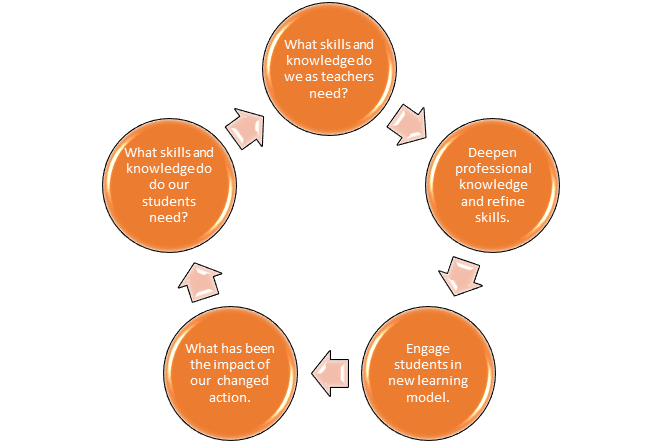
Teacher Inquiry and Knowledge Building Cycle 

to Promote Student Outcomes

This past year our school purchased 15 Chromebooks and 10 mini IPads. As a result my teaching partner, Chantelle Davies and I had the fortune or misfortune, depending on one’s point of view, of being the first to use this technology in our school. We were going to have to teach children how to use Chromebooks despite our lack of knowledge of the new tool. Thus we began our journey into collaborative teacher inquiry.  The need for the students to learn about Chromebooks was the catalyst for us to learn about Chomebooks, Google Drive, and to revisit our approach to teaching.
The cycle in the diagram, Teacher Inquiry and Knowledge Building Cycle to Promote Student Outcomes, illustrates the process we went through as a team.  In the end we were able to teach students how to research, collaborate, and create; while engaged in their own inquiry learning process.  As we reflected on our work, we realized that our students needed more exposure to 21st century technologies and that lead Chantelle and I to further explore the use of technology in the classroom.  


To further explore 21st century technology, we as a team, decided to enroll in Integration of Information and Computer Technology in Instruction Part 2.  Our goal for this course was to apply our new knowledge to improve student learning.  We originally thought that we would collaborate together while taking the course or in other words, discuss tasks and support each other.  Once we enrolled and discussed the course with our instructor, we discovered that we would be able to continue with our collaborative teacher inquiry.  What this means is that Chantelle and I were able to use this course as a way of meeting the students needs for the upcoming school year.


In order to meet the needs of our students, we looked at the tasks and requirements for our course and modified them (as best as we could within the confine of the course)  to reflect the learning outcomes we expected for our students.  We have been given control of the direction of our learning, while keeping our students in mind.  This has allowed us to focus on the tasks and to go deeper into content.  We are no longer covering the material, but are considering and reflecting on how this will enhance student learning.  Our reflection has lead to many, MANY hours of discussion of what our students needs are, what learning they need, and what learning or inquiry we will proceed with.  Sometimes our reflective thinking has us so caught up in what is best for our students, that we have gotten side tracked from completing tasks for this course.  The challenge has been how to fit what we want to learn in greater depth in with the modules required by the university  and the OCT.  We are grateful that our instructor, Zoe Branigan-Pipe has been patient as we muddle through this.  We have decided to explore specific tools and resources that will be used and applied in our classrooms in a way to create new tasks that challenge our students to think deeper, create and collaborate more often.


Click to find image source
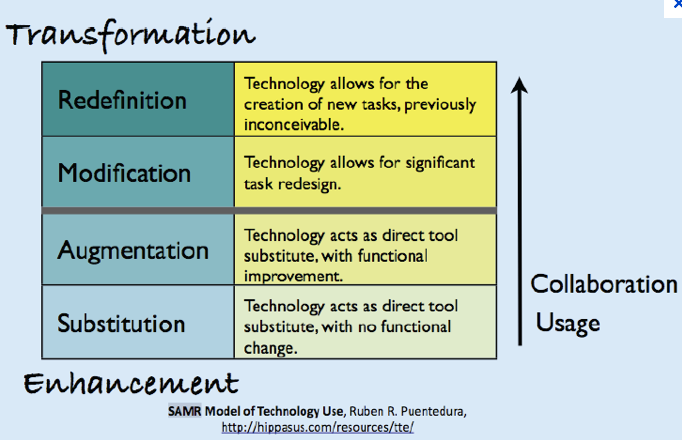
As we entered this journey of learning, we both realized we entered this process at different points. Our comfort, knowledge, and abilities with technology differ. By applying these entry points to the SMAR model we can see where our focus needs to be and what our next steps are to move to a new level.  To learn more about the SMAR model follow the attached link: SAMR Model.  In the past, I have been primarily using technology to show content through projectors and have students research (substitution).  My partner had begun to use technology to do blogging, record assessment, and create interactive smart board lessons (augmentation). Collaboratively, we used technology that allowed our students to work together in order to share information (augmentation).   Though our entry points differ in regards to our knowledge, our end goal is common to use technology to redefine tasks. 

We are working together to grow our knowledge and learn from and with each other. Prior to the start of this course we were reflecting on what we had done with the Chromebooks and IPad minis and we were brainstorming ways that we could help our students get more out of their use next year. Already, this course has given us time to think about lessons that redesign our original pen and paper tasks of the past; and in some cases, we have started to plan student tasks that will help us transform student learning. Hopefully it will be as successful for us when we put theory into practice.

How has collaboration changed your teaching practice?  Where and when do your best conversations with your teaching partner take place?

Disclaimer: This post was co-written by myself and my teaching partner, Chantelle Davies. It has been adapted for each of our blogs.